Finding the Right Office Chair for How You Actually Work
An office chair isn't just another piece of furniture. It's where you spend most of your waking hours if you work at a desk, run a business from home, or split time between creative projects and administrative tasks. The right chair shapes how your body feels at the end of the day, how clearly you think during long meetings, and whether you have the energy to pursue personal interests after work. Getting this decision right matters more than most people realize until they've spent months in a chair that doesn't fit them.
People shop for office chairs with a mental checklist: adjustable height, lumbar support, armrests that move, decent wheels. But what often gets overlooked is how the chair fits into your specific daily rhythm. Someone editing video for ten hours needs different support than someone who rotates between a standing desk and seated work. A freelancer working from a compact apartment has different space constraints than a corporate office manager ordering for a team. The conversation around office chairs works best when it starts with actual scenarios rather than spec sheets.
When the Home Office Becomes Your Main Workspace
The shift toward remote and hybrid work turned spare bedrooms and kitchen corners into permanent offices. What worked temporarily during a short transition period often fails under daily use over months and years. A kitchen chair with a cushion might feel fine for an hour but causes lower back stiffness by mid-afternoon when you're deep into spreadsheet work or client calls.
For the remote worker, an office chair needs to handle long uninterrupted stretches. Look for seat depth adjustment so your thighs stay supported without cutting off circulation behind your knees. Mesh backs help in warmer rooms without dedicated climate control. If you share the space with family or roommates, quieter casters matter more than you'd expect. Small details like armrests that slide under a desk when not needed make a real difference in tight spaces where every inch counts.
Creators and entrepreneurs working from home often switch between tasks rapidly. One hour involves sketching or writing, the next jumps to a video call, then back to focused design work. An office chair that reclines smoothly and locks at different angles supports this kind of varied workflow. Being able to lean back slightly during brainstorming sessions or sit upright for detailed tasks changes how naturally ideas flow.
Professional Environments Where Impressions and Comfort Overlap
In offices, coworking spaces, and client-facing settings, an office chair serves two purposes. It needs to keep you comfortable through long days, but it also contributes to the visual language of your workspace. A well-chosen chair signals attention to quality and care for the people who use it, whether that's employees, clients, or collaborators dropping by.
Small business owners furnishing a boutique office or consulting space often look for chairs that balance professional appearance with genuine ergonomic support. The chair shouldn't dominate the room visually but should hold up under daily use without sagging cushions or peeling material after six months. Upholstery choices matter here. Fabric breathes well but shows stains more readily. Leather or faux leather cleans easily but can feel hot during summer months. The decision depends on your climate, how many people use the chair, and what kind of work happens in the space.
Educators and trainers who move between sitting at a desk and standing near a whiteboard benefit from chairs with easy adjustability and smooth mobility. Being able to pivot toward students, roll aside when presenting, and return to a comfortable seated position without fussing with complicated levers keeps the focus on teaching rather than furniture frustrations.
Creative Professionals and the Tools That Support Their Work
Graphic designers, illustrators, and digital artists often maintain unusual postures while working. Leaning forward toward a tablet or display, shifting weight to one side while sketching, or reclining while reviewing work on a large screen. Standard office chair recommendations don't always account for these patterns. A chair with a flexible back that moves with you, rather than forcing a single rigid posture, suits creative workflows better. The ability to adjust tension on the recline mechanism means lighter users aren't fighting the chair and heavier users don't feel unsupported.
For those who create visual content about workspaces, interiors, or productivity tools, having quality visual references becomes important. Whether you're a blogger writing about home office setups, a marketer designing promotional materials for ergonomic products, or a small business owner updating your website with workspace imagery, clear and adaptable illustrations save significant time. This is where thoughtfully designed digital resources enter the picture.
Bringing Visual Ideas to Life Without Starting from Scratch
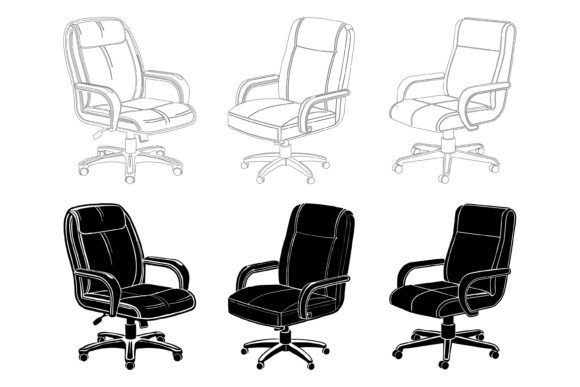
The Hello Welcome Special AI EPS illustration set offers something practical for anyone who needs to communicate visually about workspaces, furniture, or interior concepts. The collection includes office chair illustrations and related workspace imagery in AI, EPS, and JPG formats, organized with a clean file and layer structure that makes customization straightforward. Both Mac and Windows users can work with these files without compatibility headaches.
What makes an illustration set genuinely useful isn't just the number of files included. It's how easily you can adapt them to your specific project. The organized layer structure in this collection means you can isolate individual elements, recolor chair upholstery to match your brand palette, or modify shapes to better represent your actual products. A blogger comparing ergonomic chairs can quickly generate consistent comparison graphics. An app developer building a workspace customization tool can integrate icons and symbols without commissioning custom artwork for every variation. An educator preparing training materials about proper desk ergonomics can pull clean, professional visuals directly into slides or handouts.
The attention to detail and consistency across the set matters when you're creating multi-page documents, website sections, or app interfaces where visual coherence affects perceived quality. Inconsistent line weights, mismatched perspectives, or varying levels of detail across illustrations from different sources create a subtle but real sense of amateur work. A cohesive set eliminates that problem.
Practical Considerations Before Choosing Your Chair or Visual Resources
With office chairs, testing before buying remains ideal but isn't always possible. When you can't sit in a chair before purchasing, pay close attention to seat dimensions listed in specifications. A seat that's too deep for your leg length forces you to either perch forward without back support or dangle your feet, which creates pressure points. Weight capacity and foam density affect how the chair feels after months of use, not just on day one. Warranty terms reveal what the manufacturer actually expects from the product's lifespan. A ten-year warranty on components versus a one-year warranty on fabric tells you where corners may be cut.
Assembly difficulty ranges widely between models. Some chairs ship nearly fully assembled with clear instructions and quality tools included. Others arrive in dozens of pieces with diagrams that seem designed to confuse. Reading recent reviews specifically mentioning assembly experiences gives you realistic expectations. If you struggle with mechanical tasks or have limited time, choosing a chair known for straightforward setup saves genuine frustration.
For the illustration set, consider what formats and editing capabilities you actually need. If you work in Adobe Illustrator, AI and EPS files give you full vector editing freedom to recolor, resize without quality loss, and adapt individual components. JPG versions serve quick preview needs or projects where high-resolution raster files work fine. The set's suitability for print, web, symbols, apps, and infographics means one purchase covers multiple project types rather than requiring different resources for each medium.
When Quality Visuals Support Better Decisions
Marketers and publishers writing about office chairs face a common challenge. Stock photos of chairs often show unrealistic, staged environments that don't help readers picture how a chair fits into their actual space. Vector illustrations offer a cleaner alternative. They strip away distracting backgrounds and focus attention on the chair itself, its proportions, and its features. An infographic comparing lumbar support mechanisms across three chair models becomes clearer when rendered with consistent, editable vector art rather than mismatched photographs with different lighting and angles.
Small business owners selling office furniture benefit from being able to quickly create consistent product comparison pages, social media graphics, and email newsletter imagery. The ability to change colors in the illustration set means a single chair illustration can represent multiple color options without requiring separate photographs for each variant. For shops with limited photography budgets, this fills an important practical gap.
Freelancers who build websites for furniture retailers or interior designers can use these illustrations as placeholder content while waiting for final product photography, helping clients visualize layouts and content structure early in the project. This keeps work moving forward rather than stalling while waiting for assets.
Natural Ways Different Users Find Value
A content creator filming a YouTube review of budget office chairs needs thumbnail graphics, on-screen comparison charts, and maybe simple animations showing adjustment mechanisms. The AI and EPS files give them source material flexible enough for all those outputs while maintaining a consistent visual language that strengthens their channel's brand.
An entrepreneur launching an ergonomic consulting business needs to create assessment forms, recommendation guides, and educational materials for clients. Clean illustrations explaining proper sitting posture, chair adjustment steps, and workspace layout principles make complex information more digestible than text alone. Being able to modify the illustrations to match their brand colors creates a professional impression from day one.
A hobbyist researching their first serious desk chair for a gaming or crafting setup might not need illustrations directly. But the articles, reviews, and comparison guides they read benefit when publishers have quality visuals that make distinctions between chair types immediately clear. Better visual communication in the content ecosystem helps everyone make more informed choices.
What connects all these scenarios is practicality. Whether choosing a physical chair for your body or digital resources for your projects, the goal is finding something that works reliably, adapts to your specific situation, and doesn't create more problems than it solves. Office chairs and the visual tools used to communicate about them both serve people best when they're built with real usage in mind rather than abstract ideals.