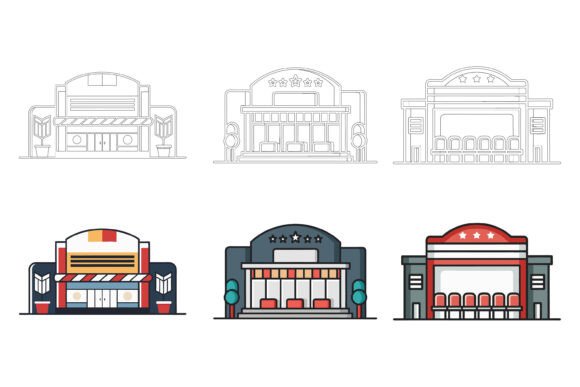
City Buildings Exterior Collection
Every visual project that involves urban environments, architectural metaphors, or location-based storytelling eventually runs into the same challenge: finding exterior illustrations that maintain stylistic consistency, adapt to different formats, and can be modified without breaking the overall design. The City Buildings Exterior Collection addresses this need directly. It is a curated set of vector illustrations designed to represent cityscapes, commercial facades, and urban architecture in a clean, editable format. For marketers, product designers, publishers, and anyone who communicates ideas visually, this collection removes the friction of building consistent exterior scenes from scratch or patching together mismatched assets from multiple sources.
What sets this particular collection apart is not just the artwork itself, but the strategic thinking baked into the file structure. The package includes AI (Adobe Illustrator) and EPS files, along with a JPG preview. This combination respects the reality of multiplatform workflows: Mac and Windows users, print designers, and digital creators all get a format they can use immediately. But the deeper value lies in how the assets are organized internally—neatly layered, logically grouped, and built so that colors, details, and even individual building elements can be adjusted without disturbing the composition. That level of organization turns a simple illustration set into a flexible design system that can evolve with your projects.
Why Consistency in Exterior Visuals Matters for Your Brand
When you use building exteriors across a website hero image, an app onboarding screen, a slide deck, and a printed brochure, subtle inconsistencies in line weight, perspective, or color treatment can quietly erode the professional impression you aim to create. The City Buildings Exterior Collection was developed with a unified aesthetic: every building shares the same proportion logic, stroke style, and level of detail. This means you can compose scenes that feel cohesive even when mixing residential, commercial, and industrial structures. For a brand that wants to project stability, local expertise, or forward-thinking urban identity, that visual consistency supports credibility without the need for a dedicated custom illustrator on every project.
Moreover, consistency extends beyond the visuals themselves. The organized layer structure allows your team to apply brand color palettes across dozens of buildings in minutes, turning a generic skyline into a branded cityscape that aligns with your visual identity guidelines. This is particularly useful for businesses that operate in real estate, smart city technology, urban planning consulting, or local government communication—fields where building exteriors are not mere decoration but carry functional meaning.
Strategic Planning: Matching the Collection to Your Communication Goals
Before integrating any illustration into your workflow, it pays to define what you need the exterior imagery to accomplish. Are you using building icons as navigational symbols in an app? Do you need a detailed background scene for a report cover? Are you building an infographic that compares architectural styles or property sizes? The City Buildings Exterior Collection supports all of these, but the approach will differ. Because the files are fully editable in vector software, you can simplify a detailed facade into a minimal icon, or combine several buildings to form a panoramic street view. This flexibility means you are not locked into a single use case; you can extract, repurpose, and recombine elements to suit the specific narrative of each project.
Consider creating a simple context-to-output mapping before you start. For an app interface, you might isolate flat, symbol-like building icons and adjust their line weights to match your UI library. For a printed annual report, you may need more elaborate exteriors with subtle gradients that communicate depth and solidity. By planning these use cases, you can build a small asset library from the collection, rename the modified files according to your system, and ensure every team member pulls from the same source of truth. This pre-planning turns a one-time purchase into a reusable resource that supports multiple campaigns, products, and communication channels.
Customization as a Competitive Edge
The ability to edit vector files is common, but the ease with which you can modify assets varies dramatically across collections. The City Buildings Exterior Collection emphasizes practical editability: colors can be changed globally, building components are separated into meaningful layers, and details are not flattened into unbreakable groups. This means a marketing designer can quickly re-skin a building to match a client's corporate blue, while a product illustrator can tweak window arrangements to suggest different building types without redrawing from scratch. The time saved on these adjustments compounds when you consider multi-channel campaigns where the same building might appear in a social media graphic (requiring a specific crop), a printed flyer (requiring CMYK values), and an infographic (requiring reduced detail for clarity).
One often-overlooked advantage is the ability to create derivative works that feel original. By changing colors, adding signage, or slightly altering proportions, you can generate multiple distinct cityscapes from a single collection, making it harder for your audience to notice pattern repetition—a common weakness of relying on stock imagery. This helps maintain a fresh, custom feel even when operating at scale.
Where the Collection Fits into a Broader Workflow
For web and app projects, the AI and EPS files integrate directly into UI design tools, allowing you to export clean SVGs or PNGs for use in prototypes and production. Because the illustrations are vector-based, they scale perfectly and remain crisp on high-resolution displays. For print, the same files can be opened in layout software, with colors adjusted to match the specific printing process. The included JPG previews speed up the selection process, letting you browse and compose without opening heavy vector files, a small but meaningful workflow optimization for busy teams.
Beyond typical design tasks, the collection serves well in infographics, training materials, and pitch decks. A sequence of building exteriors can illustrate growth, market expansion, or community impact without resorting to generic clip art. Educators and consultants can use the buildings to create scenario maps or facilitate workshop exercises around urban topics. The key is to view the collection not as a static gallery but as a toolkit of modular parts that can be arranged and styled to support specific learning or persuasion objectives.
Common Pitfalls When Using Exterior Illustrations Without Clear Intent
Even the best illustration collection can weaken your output if used without a clear visual strategy. One risk is inconsistency in lighting and shadows when mixing illustrations from different sets, so resist the temptation to supplement with random external flourishes unless you carefully match the style. The City Buildings Exterior Collection mitigates this by providing enough variety within one cohesive style, but if you need elements not included, you must either edit from the existing buildings or source complements with extreme care.
Another pitfall is over-complication. A building exterior might look stunning in isolation, but when placed in a dense layout with heavy text, it can create visual noise. Consider reducing detail, using monochrome versions, or fading the background to ensure the illustration supports the message rather than competing with it. The editable nature of the vector files makes this easy to do, but it requires a conscious decision at the composition stage. Always ask: is the building here to set context, to serve as a navigation cue, or to evoke an emotional response? That answer should guide how prominently you render it.
Finally, avoid using the collection as a shortcut to bypass deeper planning. An illustration of a bustling city block won't compensate for unclear content or a weak value proposition. The visuals amplify the message; they don't create it. Use the collection to reinforce a well-structured narrative, not to distract from the lack of one.
Long-Term Value: Building a Visual Asset Library
For organizations that produce regular content, building a curated visual asset library pays dividends over time. The City Buildings Exterior Collection, once purchased, becomes a permanent resource. You can tag and catalog the individual buildings, create templates that use specific configurations, and train new team members on how to access and adapt the assets. This reduces the need to purchase new illustrations for every project and creates a consistent visual thread across years of marketing materials. When the same refined building exteriors appear in a company's 2023 brochure and its 2026 website refresh, the brand memory compounds, and the investment in the collection proves its worth.
To maximize long-term value, store the original AI and EPS files in a non-destructive manner. Keep a master folder that never gets overwritten, create a separate working directory for modified versions, and document any brand-specific color swatches or style modifications you apply repeatedly. This simple discipline turns a one-time purchase into an evolving design system that scales alongside your needs.
When This Collection Outperforms Generic Alternatives
Its value becomes particularly clear in scenarios where you need a large number of exterior views, yet must maintain total control over every visual property. Generic stock photos of buildings carry licensing restrictions, cannot be easily recolored, and often clash with the clean aesthetic required for modern digital products. Generic icon sets might offer buildings but lack the variety in facades, rooflines, and proportions to create believable street scenes. The City Buildings Exterior Collection bridges that gap: you get enough detail to create context-rich environments without sacrificing the editability that custom work provides.
This collection also shines when rapid iteration is needed. A proposal team preparing multiple client-specific presentations can quickly modify building colors and layouts to reflect each prospect’s local skyline, making the output feel personal and researched. In-house agencies serving multiple brands can maintain a single source for exteriors yet tailor the output to vastly different brand personalities. The time and cost savings in such scenarios are substantial compared to commissioning new art each time.
Making an Informed Decision
Before integrating the City Buildings Exterior Collection into your toolkit, review the specific file contents and previews to ensure the architectural variety aligns with your most common use cases. If your work frequently references schools, hospitals, offices, shops, and mixed-use buildings, the coverage is likely sufficient. If you need highly specialized structures like airports or stadiums, you may need to augment the set. However, the editable nature of the files lets you modify existing building blocks to approximate many structures, which reduces the need for supplementary purchases.
Also consider the software skill level of the people who will modify the files. Basic color swaps require only a beginner's understanding of Adobe Illustrator or a compatible vector editor. More advanced modifications, such as reshaping a roof or adding signage, require intermediate skills. The organized layer structure significantly lowers the barrier, but a short internal guide or video walkthrough can help non-designers on your team access the simpler adjustments, broadening the collection's utility across departments.
The Hello Welcome to our Special AI EPS Collections marks this product as part of a broader series designed for practical creative work. The emphasis on Mac and Windows compatibility, file organization, and detail quality signals a producer that understands the realities of modern design production. If your projects demand exterior illustrations that can be fully adapted rather than merely placed, this collection merits serious consideration as a foundational visual resource.