Baseball Players Set: A Practical Look at AI EPS Illustration Collections
Designers, marketers, and content creators who work with sports themes often need reliable visual assets that can adapt to many project types. A Baseball Players Set delivered as an AI EPS illustration collection offers a ready-made vector option that covers multiple formats, organised layers, and editable details. This type of resource is intended for people who want to move quickly from idea to finished graphic without commissioning custom artwork or hunting through inconsistent stock libraries. Understanding how such a set compares with alternatives, what it does well, and where it may fall short helps you decide whether it deserves a place in your asset toolkit.
What a Structured AI EPS Illustration Pack Actually Contains
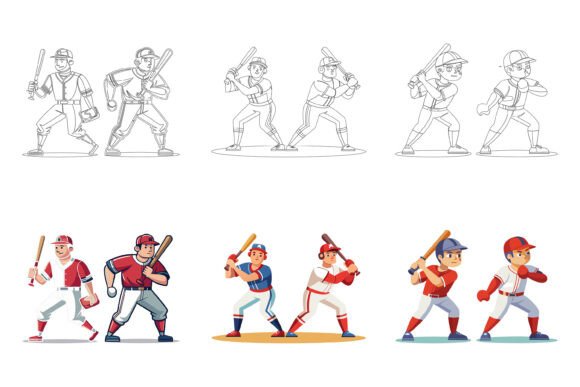
When a product is described as a Baseball Players Set with AI, EPS, and JPG files included, it usually means you receive source files built in Adobe Illustrator along with a universal Encapsulated PostScript version and flattened JPG previews. The file structure is typically organised into clearly named layers and groups, making it easier to isolate a single player pose, adjust a bat angle, or recolour a uniform. Because the set is designed for both Mac and Windows environments, cross-platform compatibility becomes less of a worry. The vector nature of AI and EPS means you can scale from a tiny app icon up to a large poster without losing sharpness, and the included JPGs give you quick reference or web-ready options.
Perfection in details and consistency across different poses and characters are often cited as key selling points. That consistency means a youth baseball league’s event flyer and its website banners can use different players from the same set and still look unified. The editable icon design also invites customisation: changing team colours, removing a background, or simplifying a figure for an infographic are relatively straightforward tasks if you have basic vector editing skills.
Comparing Pre‑Built Vector Players to Other Visual Approaches
A ready-made Baseball Players Set sits somewhere between fully custom illustration and generic stock photography. Each path has its own tradeoffs, and the right choice often depends on time, budget, and how distinct you need the final visual to look.
Custom Illustration
Hiring an illustrator gives you a unique style that nobody else can replicate. The characters can match your brand’s exact facial features, proportions, and storytelling needs. The obvious drawback is cost and lead time. A single custom playing figure with multiple revisions can cost more than an entire vector pack, and you might wait weeks for delivery. If you are launching a major brand campaign or a mascot-led identity, that investment makes sense. For most everyday projects—social media posts, coaching drill diagrams, event signage—the uniqueness of custom work may not justify the expense when a well‑built set can be customised just enough to feel like your own.
Stock Photography and Raster Graphics
Stock photos of real baseball players offer authenticity but come with limitations. Cropping, colour matching with your palette, and overlaying text on busy backgrounds can be difficult. Photographs also don’t scale infinitely like vectors, and they often feel out of place in flat‑design interfaces or modern infographics. The AI EPS illustration occupies a middle ground: it gives you the stylistic control of vector art while still conveying the motion and spirit of the sport, without the compositional rigidity of a photo.
Other Vector Icon Packs
Many marketplaces sell single‑sport icon sets with simplified stick‑figure poses or limited variations. The more elaborate a Baseball Players Set is in terms of action poses, detail, and peripheral elements (bats, gloves, bases, catcher’s gear), the more it functions as a full‑fledged illustration library rather than a handful of symbols. If you need to illustrate a training manual or a multi‑screen app flow, deeper variety prevents repetition and visual fatigue. On the other hand, if your project only ever needs one generic pitcher silhouette, a simpler and cheaper icon pack might be a better fit.
Strengths That Go Beyond the Obvious
- Editable layers and organised files. Instead of hunting through dozens of unnamed paths, you can open a well‑structured AI file and immediately locate the element you want to change. This cuts down revision time significantly, even for people who don’t use Illustrator every day.
- Print and digital readiness. Because the native files are vector, the same graphic can appear crisp on a business card, a trade show banner, and a mobile app. Having JPG versions on hand also speeds up digital mockups and web uploads.
- Visual consistency across formats. Illustrations that start from the same designer’s template share line weights, shading, and proportions. This gives a finished look to multi‑page documents or multi‑asset campaigns.
- Mac and Windows compatibility. The EPS format bridges older software and different operating systems, while AI files work natively in Illustrator on either platform. This reduces friction in collaborative environments where team members use different machines.
Real‑World Scenarios Where the Set Excels
Imagine a community college that needs to promote its intramural baseball programme. The athletics department wants a series of social media posts, a printed schedule, and an app icon for the sports portal. By purchasing a single Baseball Players Set, the student designer can pull a batting figure for Instagram, a fielding figure for the timetable, and a simplified pitcher silhouette for the app—all recoloured to the school’s identity in under an hour. The alternative of drawing these from scratch or piecing together inconsistent free icons would take much longer and look less polished.
A health tech startup building a physiotherapy app might use the same set to illustrate range‑of‑motion exercises. The editable nature of the icons lets the team adjust arm positions to match clinical instructions, while the consistent style keeps the interface clean. In both cases, the ability to modify the artwork without starting from zero is what makes the set practical, not just decorative.
Tradeoffs and Where You May Need a Different Option
No single asset collection can cover every need perfectly. One limitation of a pre‑built Baseball Players Set is that other brands or teams may also use it, and the core poses are fixed. If your project demands extremely specific actions—a player sliding into home plate while a catcher blocks the plate in a particular vintage uniform style—you might find the included choices too generic. Also, while colour changes are easy, fundamentally altering the anatomy or perspective of a figure can be difficult and may require intermediate Illustrator skills.
For high‑budget advertising where originality is a competitive edge, even a highly editable set might feel like a compromise. A sports brand launching a new line of footwear may want a bespoke illustrated hero figure that tells a story no template can convey. In that situation, the set could still serve as a valuable placeholder during early concepting, but the final asset should probably be commissioned.
Using the Set Across Different Media Without Losing Quality
Because the files come as AI and EPS, you are not locked into a single resolution. A few practical tips help maintain quality across outputs:
- For print: always work from the vector file and export to the required print resolution (usually 300 dpi) in your design software. You can scale up to poster size without pixelation.
- For web and apps: use the JPG for quick placement, then export optimised PNG or SVG versions for production. The vector source lets you control exact dimensions and colour profiles.
- For infographics and symbols: simplify the figure by deleting unnecessary layers. A detailed player might be visually overwhelming in a small chart; using the same base illustration with a reduced detail level keeps it readable.
How Organisation and Layer Structure Influence Workflow
A Baseball Players Set described as having a “neatly organised file and layer structure” appeals not only to professional designers but also to volunteers and entry‑level creators who might otherwise struggle with complex vector files. When each player’s body parts, uniform components, and shadow effects sit on clearly named layers, you can make adjustments without accidentally ungrouping the entire illustration. This approach turns a static icon library into a flexible building kit. For instance, you can swap a batter’s helmet colour across twenty social media templates in minutes, or isolate the glove to create a standalone emblem.
What to Consider Before Adding It to Your Collection
Evaluating whether this resource matches your typical project load means weighing a few practical factors:
- Frequency of use. If you regularly produce baseball‑themed content—coaching materials, league websites, sports blogs, event posters—the cost per use becomes very low. If this is a one‑time project, a subscription‑based stock service with a few baseball vectors might be more economical.
- Design software access. Editing AI and EPS files requires vector editing software such as Adobe Illustrator, Affinity Designer, or Inkscape. While the set is compatible with both Mac and Windows, not everyone has access to these tools. The included JPGs offer a workaround but lack full editability.
- Stylistic match. Look closely at the illustration style before committing. A set that leans cartoonish could clash with a sleek tech interface, whereas a highly realistic vector may feel over‑detailed for minimalist branding. A product preview or sample images usually reveal enough to judge this.
- Licensing scope. Understand whether the purchase allows use in commercial products, merchandise, or unlimited end products. Many vector sets come with standard licences that suit most needs, but if you plan to print the artwork on jerseys for resale, confirm the terms.
When the Set Might Not Be Enough
A Baseball Players Set provides great starting material, but some creative directions demand more. If you need a visual that evolves over a season—say, a mascot that changes expression or outfit weekly—then the static set will require constant manual editing that may become tedious. In interactive projects, like a sports game UI that needs animated frames, a sprite sheet or motion‑ready character pack would serve you better. The static AI EPS format is best suited for still graphics, and while you can export separate frames by manipulating layers, it wasn’t designed for frame‑by‑frame animation workflows.
Blending the Set with Other Visual Elements
One of the more effective ways to use a Baseball Players Set is to treat it as a foundation rather than the entire visual. You can combine a posed player with custom typography, abstract graphic shapes, or photography to create a layout that feels personalised. A common technique is to use the vector player as a silhouette overlay on a real stadium image, or to place a monochrome illustration next to bold headline text. Because the source files are editable, you can extract only the outline or create a duotone effect that ties into your colour scheme. This hybrid approach often masks the “stock” origin of the artwork.
A Balanced View of AI EPS Illustration Collections
Vector packs like the Baseball Players Set fill a practical gap. They are neither a replacement for skilled illustration nor an inferior substitute for photography. Their value comes from the combination of editability, cross‑platform compatibility, and the time they save on repetitive tasks. A designer preparing a tournament schedule, a coach building a playbook, or a marketer running a campaign across multiple channels can all benefit from a well‑organised, consistent set of players that can be scaled and modified on demand.
At the same time, recognising the limitations—limited pose variety compared to infinite custom work, the learning curve for deeper edits, and the risk of others using identical artwork—allows you to make a more informed choice. In many real‑world scenarios, those limitations are minor when weighed against speed, cost, and visual unity. As with any asset purchase, aligning the product’s strengths with your project’s actual requirements leads to a smoother workflow and a more professional result.