Evaluating Fish Vector Illustration Sets: A Practical Guide
Designers, content creators, and app developers often need high‑quality fish imagery—for marine biology apps, seafood restaurant branding, educational materials, or infographics about aquatic ecosystems. A dedicated fish illustration set in AI, EPS, and JPG formats can save hours of drawing time while providing consistent, editable assets. But how do you decide whether such a collection aligns with your project goals? This article examines what a professional fish AI EPS set typically offers, the real‑world benefits and tradeoffs, and the situations where it proves most useful.
What a Fish AI EPS Illustration Set Actually Contains
A fish illustration set designed for modern workflows usually bundles vector source files (.AI and .EPS) with a high‑resolution preview image (.JPG). Because the files are built for both Mac and Windows, compatibility rarely causes friction. The core of the set is a curated library of fish depictions—realistic species, stylized icons, or a mix—that share a unified visual language.
The internal structure matters as much as the artwork itself. A quality collection keeps files neat and logically segmented. You can expect clearly named layers, grouped elements, and sometimes separate artboards for each fish. This organization means you won’t waste time hunting for a specific tuna or clownfish graphic, and you can easily isolate fins, scales, or silhouettes for customisation.
Why Designers Turn to Ready‑Made Fish Graphics
Creating a dozen fish illustrations from scratch demands both artistic skill and subject knowledge—a barracuda needs the right jaw structure, a discus fish requires accurate lateral lines. For most commercial projects, achieving that level of detail isn’t practical under tight deadlines. Ready‑made fish vectors bridge this gap.
They also serve as a consistent starting point. When a brand, app, or print project needs fish icons across multiple touchpoints, a unified set prevents the mismatch that often happens when pulling assets from various free libraries. Because the illustrations originate from the same designer, stroke weights, color palettes, and proportions remain coherent, strengthening the overall design system.
Key Features That Define a Professional Fish Vector Set
- Multiple file formats: AI and EPS vectors allow unlimited scaling without quality loss, while the JPG provides a quick place‑holder or web preview. All formats together support print, digital, and presentation needs.
- Cross‑platform readiness: Explicit Mac and Windows support ensures that both freelance designers and in‑house teams can open and edit files using Adobe Illustrator, Affinity Designer, CorelDRAW, or similar software.
- Neat file and layer structure: Organised layering—often separating fins, body, and background elements—makes it simple to hide, recolour, or repurpose parts of a fish without dismantling the entire graphic.
- Detail consistency: Uniform line art quality, gradient usage, and shading across all fish prevent a “patchwork” look, even when you combine multiple species in one layout.
- Intuitive editability: Because the artwork is fully vectorised, you can change colours, resize fins, or modify silhouettes with a few clicks. This adaptability is critical when the fish need to match a brand palette or accessibility contrast requirements.
Practical Benefits and Real‑World Advantages
Time savings rank highest among the advantages. Assembling a marine‑themed infographic or an underwater app interface becomes a matter of drag, drop, and adjust rather than painstaking illustration. The consistent detail also elevates perceived quality; clients and end‑users notice when every fish looks purpose‑built rather than borrowed.
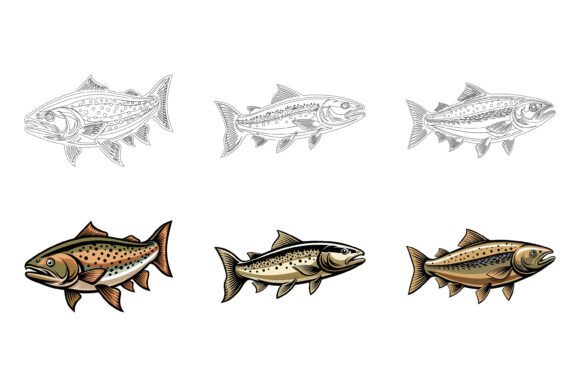
Another under‑discussed benefit is the set’s suitability for multiple media. The same vector fish that appears on a trade show banner can be resized for a mobile app button or printed on a product label without pixelation or re‑rendering. Because many sets include both filled and outlined versions, you can adapt the same fish to light and dark backgrounds effortlessly.
Editability also future‑proofs your investment. A year after the initial project, you might need to repurpose a set of reef fish for a new website. Instead of hunting for compatible source files, you can reopen the original AI, tweak hues, and export updated assets within minutes.
Tradeoffs and Limitations Worth Considering
No design asset is universally perfect. A fish illustration set, while versatile, comes with a few constraints. The most obvious is stylistic lock‑in. If the collection uses a hand‑drawn, cartoonish aesthetic, it will struggle to fit a hyper‑realistic infographic or a minimalist scientific poster. Before buying, verify that the available previews match your project’s visual direction.
File size and software dependency are also common friction points. AI and EPS files can become heavy, especially when they embed complex gradients or many fishes on a single artboard. Teams that rely on free, lightweight vector editors may encounter compatibility glitches, even though the files technically support multiple platforms.
Another point is partial suitability. A set may excel at saltwater tropical fish but lack freshwater species you need, or offer brilliant silhouettes but inadequate internal anatomy for educational diagrams. You might end up purchasing additional assets to fill the gaps, which increases the total cost and coordination effort.
Finally, while you can edit colors and shapes, there is a learning curve if you aren’t comfortable with vector software. Simple hue changes are straightforward, but altering a pufferfish’s spiny texture or a lionfish’s elaborate fins requires solid Illustrator or CorelDRAW skills. Beginners may face frustration if they expect instant, one‑click modifications.
Situations Where a Fish Illustration Set Is an Excellent Fit
Certain use cases align strongly with what a well‑built fish vector collection provides. Consider the following scenarios:
- Marine‑themed apps and games: You need dozens of fish icons for an achievement system, avatars, or in‑game collectibles. A coordinated set ensures all items feel part of the same world.
- Seafood branding and menu design: From restaurant logos to takeaway packaging, stylized fish illustrations convey freshness and identity. The ability to tweak colours to match the brand’s palette is a major advantage.
- Educational content: Textbooks, flashcards, and e‑learning modules about biology or ecology benefit from anatomically consistent fish graphics. When the set includes multiple viewing angles, the material becomes more dynamic.
- Print materials and signage: Aquarium maps, fishing tournament posters, and environmental campaign flyers can all use the same vector assets. Because AI and EPS files handle large‑format print natively, you avoid the “low resolution” warning when sending files to a printer.
- Infographics and data visualisation: Replacing generic bar charts with fish‑shaped elements adds thematic flair. Uniform line weights and scalable vectors keep the infographic crisp across screen sizes.
In each of these situations, the combination of pre‑made artwork, structural organisation, and easy editability reduces both production time and the risk of inconsistency.
When Exploring Alternatives Makes More Sense
Conversely, there are times when a ready‑made fish AI EPS set may not be the most efficient or satisfying path. For projects that require a completely unique, signature illustration style—such as a premium children’s book or a fine‑art marine collection—a custom illustrator is often worth the investment. Hand‑drawn textures, painterly details, or highly stylized abstraction can be difficult to achieve by simply recolouring a vector icon.
Free illustration libraries also deserve consideration for low‑budget, low‑stakes projects. A blog post about fishing tips might only need one or two simple fish icons, which can be sourced from open‑license platforms. The tradeoff is usually limited variety and less cohesive design, but for a one‑off use, this may be acceptable.
Projects with extremely tight file size limits, such as lightweight web pages or embedded devices, might also struggle. Complex vector files can be optimised, but if kilobytes matter more than visual flexibility, highly simplified SVGs or icon fonts might serve better. Additionally, teams that prefer workflow‑integrated icons—like those built directly into a design system via Figma or Sketch—may find converting and manually syncing AI files unnecessarily cumbersome.
Lastly, if your fish illustration needs are sporadic and constantly changing, a subscription‑based graphic resource platform could provide ongoing access to fresh styles without committing to a single static set. This approach trades one‑time ownership for perpetual variety.
Practical Tips for Deciding Whether a Fish Vector Collection Meets Your Goals
Before making a purchase, run through a short checklist. This prevents impulse buys and ensures the product fits your workflow:
- Audit your fish requirements. List every species, pose, and style (realistic, flat, line art) you anticipate needing. Compare the product’s preview sheet against this list.
- Test file compatibility. If possible, open a sample vector in your primary design tool. Confirm that layers and groupings survive the import process and that fonts, if any, are outlined or easily replaced.
- Assess editability depth. Open a moderately complex fish and try changing colors, scaling fins, or removing internal details. Note how long it takes. If you find the process painful during the trial, it won’t magically improve under deadline pressure.
- Check for licensing terms. The typical commercial license covers web, print, and app use, but nuances around resale or merchandise embedding, or use in logo marks, can vary. Read the fine print to avoid legal headaches later.
- Weigh one‑time purchase vs. ongoing needs. A well‑organised AI EPS collection is a long‑term asset. If your project is a single‑run event, however, lower‑commitment options may suffice.
Integrating Fish Illustrations Into Your Workflow
Once you’ve selected a collection, treat it as a living design tool rather than a static clip‑art pack. Because the files are neatly organised and layered, you can build reusable component libraries inside your favourite design tool. For instance, extract the silhouettes to create a custom icon font, or set up global colour swatches that update all fish at once. This unlocks efficiency beyond simple copy‑paste tasks.
For print‑focused designers, the presence of both AI and EPS means you can maintain an editable master file while distributing flattened prints‑ready versions to collaborators. On the web side, exporting fish as SVG or optimising the JPG previews for banners becomes straightforward. The dual format approach also helps when working with external printers who might prefer one file type over the other.
Pay attention to the small details that reflect the set’s overall quality. A collection that meticulously builds each fish with minimal anchor points will be much snappier to edit and less likely to cause software crashes during heavy‑duty projects. Similarly, well‑named layers (e.g., “fin_dorsal” instead of “Layer 42”) reduce frustration when you’re revisiting the file months later.
Moving Forward with Confidence
A fish AI EPS illustration set isn’t a universal solution, but it fills a strategic gap for many designers and content producers. It shines when you need multiple ocean or freshwater species in a consistent, professional style and when your timeline doesn’t allow for custom illustration. The key is honest evaluation: map the set’s features—cross‑platform compatibility, editable vectors, tidy layering—against your project’s specific functional and aesthetic demands. By balancing the benefits of speed and uniformity against the tradeoffs of stylistic limitation and editing complexity, you can make a choice that strengthens your design outcome without over‑extending your resources.